dns · · 11 min read
Why Encrypt DNS Queries?
Pages may already use HTTPS, but DNS lookups are often still sent in the clear. DoH encrypts the first hop to your resolver. It is not anonymity, and it does not replace DNSSEC.
 Mttao @bearboy80 2,253 words 中文 →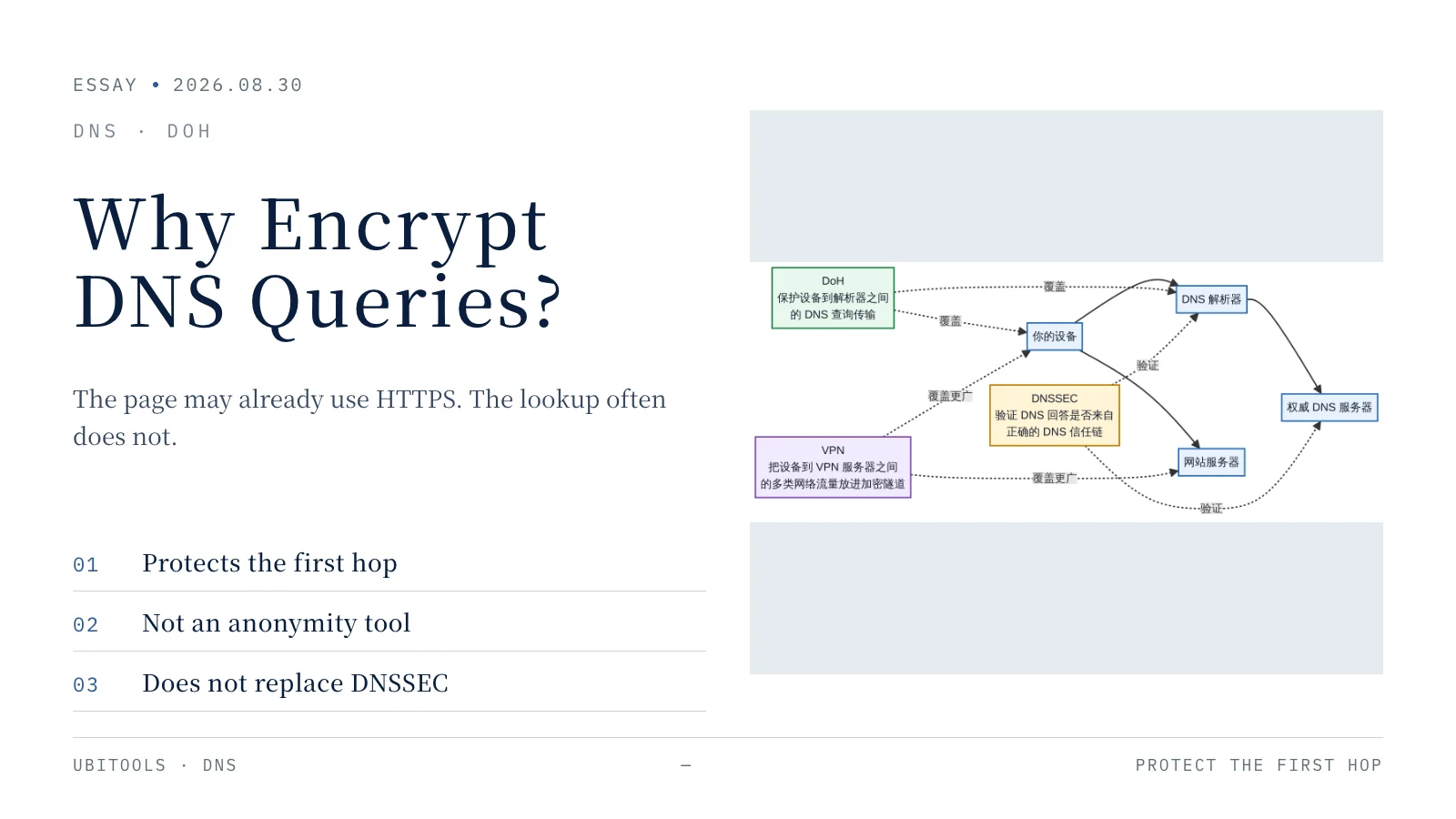
You type a URL and press Enter. On screen, one thing appears to happen: the page starts loading. Before the browser can connect to the site, it still has to finish a short, basic network step. It has to turn the domain name into an IP address the server will accept.
Say you typed www.example.com. The browser cannot open a connection with that string alone, because routers on the internet do not forward traffic by domain name. The browser first needs to know where the site’s server is, or at least which server to ask next. DNS does that work. It returns one or more records, most often an IP address. Only then does the browser start an HTTPS connection and download the page, images, scripts, and the rest.

Figure 1: A browser does not open a page from the domain name alone. It usually finishes a DNS query first, then connects to the site.
Most of the time this happens so fast that people never notice it. That is why DNS rarely enters ordinary conversation. It still sits under almost every session: opening a news site, launching a phone app, tapping a link in email, or joining a game server. The device may look up a name first.
The problem is that traditional DNS was designed early. Early enough that public Wi-Fi, mobile networks, ad tracking, and large-scale network monitoring were not part of the default picture. The goal was to swap a name for an address quickly, not to hide the question the user asked. Many traditional DNS queries still travel unencrypted over UDP or TCP port 53. The page itself may already use HTTPS, so the body text and passwords are usually not sitting in the clear. The fact that “this device just asked for that domain” can still be visible.
That is why DNS over HTTPS, or DoH, exists.
What traditional DNS actually exposes
Keep the scope honest. Traditional DNS does not mean “anyone can read everything you do online.” When a page uses HTTPS, a network bystander generally cannot read the text, form fields, or passwords on that page. DNS exposes a different layer: the name the device asked a resolver for, before the real site connection starts.
On hotel, airport, cafe, or other public networks, the network itself is usually in the forwarding path. After a traditional DNS query leaves the device, nearby network gear, the access network, or a middlebox on the path can read the queried name directly. Not all of them are watching with hostile intent. Technically, they have the chance. Some networks also use DNS for redirects, ad injection, page hijacking, or sending nonexistent names to a page they control.
DNS queries are sensitive because names themselves often carry meaning. Looking up a bank, hospital, school, job board, or a specific cloud service is not the same as leaking what you did on that site. It can still reveal what kind of service you may be approaching. Leaving that signal exposed to every network you pass through is not a good default.
DoH does not reinvent DNS. It changes how a query is wrapped when it leaves the device. IETF RFC 8484 defines the protocol: one DNS query-and-response pair is mapped into one HTTP exchange, and HTTPS supplies encryption and authentication.
What DoH does is simpler than the name suggests
“DNS over HTTPS” is easy to misread as “DNS became a website.” It did not. DNS is still DNS. The payload is still a standard DNS message. The change is that the device no longer sends that message as traditional DNS. It places the message inside an HTTPS request and hands it to a resolver that speaks DoH.
This is the same class of secure connection you already use to open a web page. The device checks the other side’s certificate and encrypts the traffic. After that, the path between you and the DoH resolver can no longer read the domain straight out of a DNS packet. Cloudflare’s DoH documentation describes the same effect: wrap the DNS query in an ordinary HTTPS request, and reduce the chance of forgery and tampering on the path.

Figure 2: On traditional DNS, network devices may read the queried name directly. After DoH puts the query inside HTTPS, the network can still see that a connection exists, but it cannot read the DNS payload directly. The DoH resolver still has to read the query to answer it.
That last sentence matters. The resolver still reads the query. If it did not, it could not tell you where the server is. DoH is not a trick that makes DNS invisible to everyone. It shrinks the set of parties that can read the query in the clear.
In the past, users often used whatever resolver the access network offered. After DoH is on, the browser, operating system, or router may send queries to a different, explicitly chosen encrypted resolver. The current Wi-Fi and the path in between have a harder time reading the query. You also hand more trust to that resolver. It knows what you asked, and it can usually see the client IP or the address of a fronting proxy.
That is not a DoH bug. It is how recursive DNS works. Any recursive resolver has to process the query. The real questions are: whom do you want handling it, how do you judge its privacy claims, what does it keep, and how long does it keep it?
After encryption, who can still know what?
Two extreme claims show up whenever DoH is discussed. Both are wrong.
The first is: “DoH is useless, because the resolver can still see the query.” That skips a separate problem: direct snooping on the path. A public network, an access network, and a DNS resolver are not the same role. Making the first two less able to read the query is a real privacy and security gain.
The second is: “Once DoH is on, nobody knows what I visited.” That goes too far. DoH protects the DNS query from the device to the resolver. It does not hide the other connections between your device and a website. It does not erase browser accounts, cookies, fingerprints, or the identifying power of an IP address. Even if you look only at DNS, the network may still see connection time, traffic size, and destination addresses.
Research also shows that encrypting DNS content is not enough to erase every traffic feature. An NDSS 2020 paper found that, under its attack model, an observer could infer some queried names from packet sizes and timing. The standardized padding the authors tested did not fully stop that analysis. This does not make DoH worthless. It reminds us that encrypting content and erasing communication traces are different jobs.
So the accurate place for DoH is this: it keeps path bystanders from easily reading or changing DNS query content, but it does not give full anonymity, and it does not take visibility away from the recursive resolver.
Resolvers also treat user data differently. Cloudflare, Google Public DNS, and Quad9 all publish privacy policies, but they describe IP handling, query logs, retention, and aggregated data in different ways. That is why “supports DoH” does not automatically mean “cares most about privacy.” The protocol is a transport. The data policy is a provider choice. You have to look at both.
DNSSEC, DoH, and VPN are not the same job
DNS has many acronyms. The ones people mix up most are DoH, DNSSEC, and VPN. All three touch security. They protect different places.
DNSSEC answers “is this answer genuine?” It adds verifiable signatures to DNS data. A validating resolver can check whether an answer came from the right trust chain, and whether it was swapped in transit or in cache. DNSSEC does not hide the query. IETF’s definition is blunt: it provides origin authentication and integrity, not confidentiality.
DoH answers “can someone read the question in transit?” It sends the query between the device and the resolver over HTTPS. DoH does not authenticate a DNS answer’s origin, and it does not turn an untrustworthy resolver into a trustworthy one.
A VPN covers more ground. It usually puts many kinds of traffic between the device and the VPN server into an encrypted tunnel. DNS is only one part of that. A VPN is not a cure-all either. It moves trust from the access network to the VPN provider. The three can work together. None of them replaces the other two.
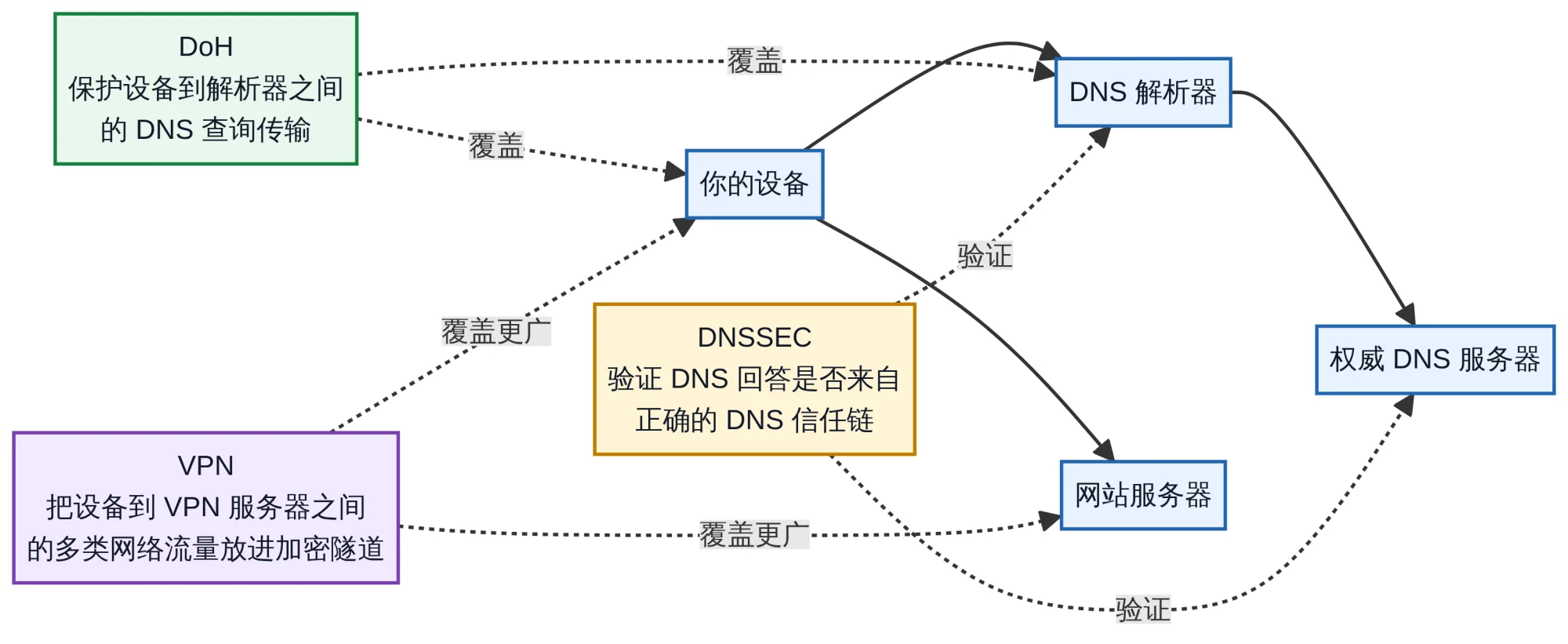
Figure 3: DoH protects DNS query transport between the device and the resolver. DNSSEC checks the origin and integrity of DNS data. A VPN usually covers a wider set of traffic, and it hands trust to the VPN provider.
Compressed into three sentences: DoH makes your DNS questions harder to read. DNSSEC helps you tell whether the DNS answer was forged. A VPN puts more of the traffic between your device and the VPN server into an encrypted tunnel. Once that is clear, it is harder to be pulled along by claims that one technology solves every privacy problem.
Does DoH make browsing slower?
There is no single answer.
DoH has to set up an HTTPS connection, so the first lookup pays a handshake cost. A single traditional DNS request is light. If you time those two in isolation, DoH can look slower. Browsers and operating systems do not start from zero for every name. They can reuse an existing connection and cache DNS answers. RFC 8484 itself discusses HTTP caching and ways to avoid splitting identical queries.
What usually shapes the experience is not the three letters “DoH.” It is how far you are from the resolver, whether the network is stable, whether the device reuses connections, the quality of the local access network, and how the chosen resolver places its nodes. An IMC 2021 measurement study found that DoH performance changes clearly with region and network conditions.
One detail is easy to miss: what happens on failure. To keep pages from breaking when a DoH service is briefly down, some browsers fall back to ordinary DNS by default. Chrome’s public write-up says that if the DoH connection fails, the browser falls back to the user’s current provider’s regular DNS and retries later. Firefox also distinguishes “prefer the encrypted resolver, fall back on failure” from “use only the encrypted resolver.”
Fallback improves availability. It also means that when the encrypted path fails, DNS may return to the traditional path. For most people, that is a tradeoff between experience and privacy. If your privacy bar is higher, the fallback setting is worth reading carefully. It is not a minor switch.
Why schools and companies treat DoH more cautiously
On home, school, and enterprise networks, DNS is often more than “find an address.” It is used to block phishing sites, malicious names, and unsuitable content, or to resolve internal names to company servers. Many security and management tools treat DNS as a control point.
If a browser or app bypasses the organization’s resolver and sends queries to a public DoH service, the filtering, alerts, and audit trails that depended on DNS can stop working. In those environments, DoH creates a real operations problem.
The answer does not have to be a return to plaintext DNS. A better path is for the organization to run or designate its own encrypted resolver, then steer clients with device management, browser policy, and system settings. Later IETF standards already describe how to do that. DDR lets a client discover an encrypted resolver run by the same operator or a cooperating one. DNR lets a network advertise authenticated DoH, DoT, or DoQ resolver settings through DHCP or IPv6 Router Advertisements.
So the problem should not be framed as “DoH takes control away from the network.” The more accurate line is: DoH forces networks to move management that used to sit on plaintext DNS onto device policy, managed resolvers, and clearer security boundaries.
Should ordinary users turn DoH on?
If you use a personal phone or computer and often join public Wi-Fi, turning on the system or browser “Secure DNS” or encrypted DNS setting is usually reasonable. It will not make you anonymous. It can reduce the chance that nearby networks read traditional DNS queries in the clear.
You do not need to finish every protocol document first. You need two facts. First, which resolver will handle the query. Second, whether the device falls back to ordinary DNS if the encrypted connection fails. The first decides whom you trust. The second decides whether the protection still holds when something breaks.
If the device belongs to a company or school, or if a home network relies on DNS filtering to block malware and unsuitable sites, do not change the setting without knowing the effect. That is not because DoH is unsafe. It is because you may be stepping around a control that is doing other work.
DoH is not mysterious. Before a browser visits a site, it usually asks DNS a question. For a long time, that question left the device in the clear. DoH puts the hop from the device to the resolver inside HTTPS. It does not solve every privacy problem. It does close a gap the internet has lived with for a long time.
Mttao GitHub ↗
Exploring technology and life's wisdom