nestjs · · 8 min read
NestJS or Express? Pick by How Big the Project Will Get
Use Express for small services, prototypes, and webhooks. Use NestJS for a business backend a team will keep maintaining. Nest still runs on Express by default. Switch to Fastify only if a load test shows the HTTP layer is the bottleneck.
 Mttao @bearboy80 1,579 words 中文 →
NestJS and Express keep getting compared. The usual line is that NestJS is “heavy” and Express is “light.” That points in the right direction, but weight alone will not tell you which one to pick.
The real question is this: do you want to build the extras yourself, or use what the framework already gives you? Express only handles HTTP routing and middleware. Checking inputs, deciding how errors look, where files go, who writes the docs, and how tests swap out the database are all left to the project. NestJS puts those jobs into a fixed structure. A team can stay aligned more easily, and the code is more likely to look the same from one person to the next.
NestJS uses Express by default
Get this relationship straight first. NestJS runs on Express out of the box. It does not replace Express. It adds modules, dependency injection, controllers, validation, and testing on top. If you need more HTTP throughput, you can switch the engine to Fastify.
In practice, treat them as three options.
| Option | How it feels to write | Typical use |
|---|---|---|
| Plain Express | You wire routes and middleware yourself. Less code, more decisions | Small APIs, webhooks, internal tools, prototypes |
| NestJS + Express | You still use the Express ecosystem, plus a fixed project layout | Business backends, BFFs, team projects |
| NestJS + Fastify | You keep Nest’s structure and swap in a faster HTTP engine | Services where the HTTP hot path is a proven bottleneck |
Choosing NestJS does not mean giving up Express middleware and tools. Most of the time, Express is still the one handling the request. The difference is that Nest already has a place for business code, shared work like auth and logging, and how modules call each other.
When Express is the better fit
Express code is direct. A request comes in. You register middleware, match a route, run the business logic, and send a response. There are not many extra ideas to learn.
That makes it a good fit for a thin service: a payment callback, a data-forwarding endpoint, an internal script, or an API you are still testing as an idea. You know what you need to do. You do not have to learn module, provider, guard, or pipe first.
The cost is just as clear. Once the project grows, you have to set the rules yourself. Where do you check inputs? How should errors look? How do you log? How does auth get wired in? How do you generate API docs? How do tests replace the database and third-party services?
Express will not decide for you. That is a plus if the team already has a mature starter with validation, logging, auth, OpenAPI, error codes, tests, and a deploy template. Keep using Express. Without that base, the maintenance bill usually shows up a few months later.
NestJS is not about HTTP. It is about working together
NestJS’s real value is how it organizes a project. It splits the work into modules. Each module holds its own controllers, services, and dependencies. Services get a database, a cache, or a third-party client through dependency injection.

Take an ecommerce admin backend. Users, orders, and payments can each live in their own module. What the order module needs, and what it exposes, is easier to see in the code. Auth, input checks, logging, and error handling also have a fixed place to go.
That may not matter on a one-person project. It matters once more people join. One person changes the order API. Another handles the payment callback. Someone else maintains the admin pages. A shared structure cuts down on “where does this logic even go?”
NestJS also has a learning cost. Developers need to understand modules, providers, scopes, and the request lifecycle. Splitting modules too thin, or sprinkling request-scoped providers everywhere, makes the code harder to read and the request slower. Nest gives you a place for things. It does not make every design decision for you.
How big is the performance gap?
I ran a local micro-benchmark on the same thin endpoint: GET /ping, returning a tiny JSON payload. Each option ran 3 rounds. Every round warmed up for 3 seconds, then ran for 10 seconds with 100 keep-alive connections.
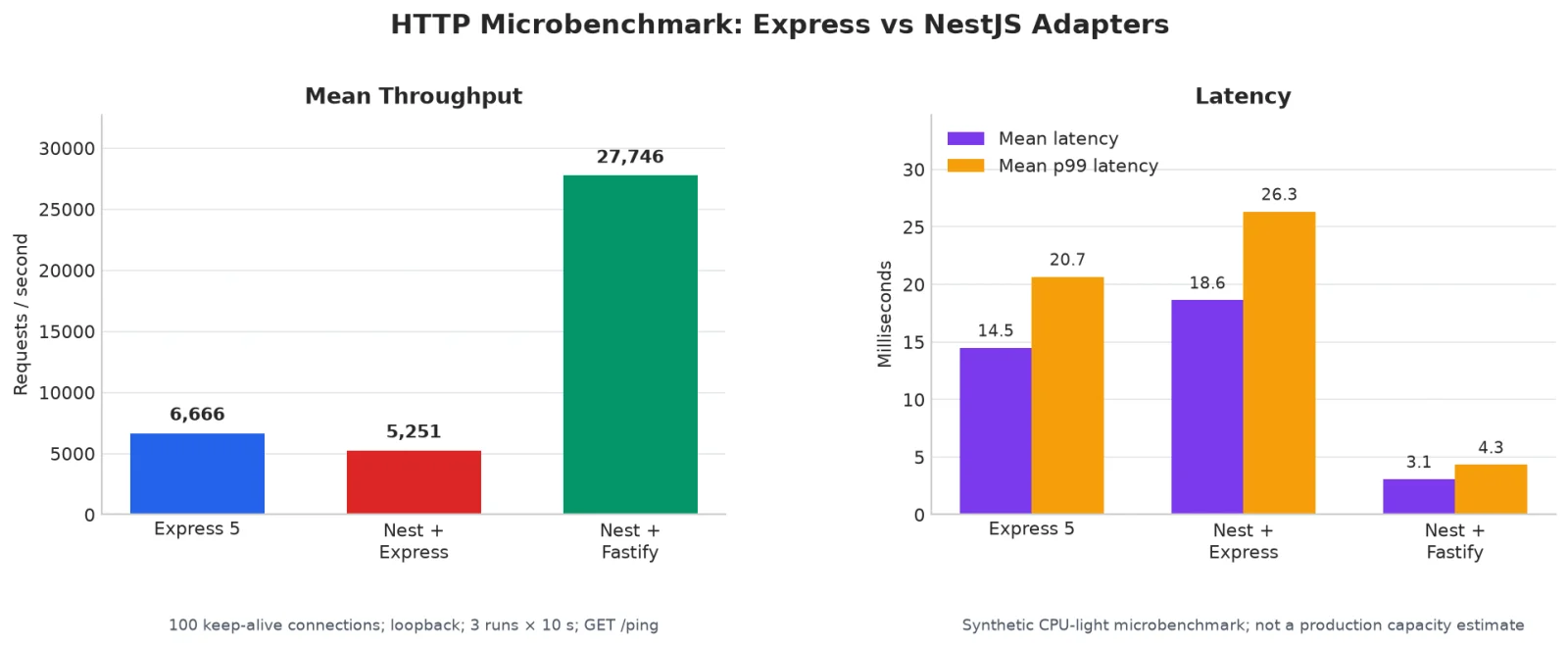
| Option | Average throughput | Average latency | What this set of numbers means |
|---|---|---|---|
| Express 5 | 6,666 req/s | 14.5 ms | The baseline for this test |
| NestJS + Express | 5,251 req/s | 18.6 ms | On a very light request, Nest’s routing and lifecycle add overhead |
| NestJS + Fastify | 27,746 req/s | 3.1 ms | Fastify’s HTTP path is faster. Most of the gain comes from the engine underneath |
The numbers are easy to read. When the endpoint does almost no work, NestJS + Express is a bit slower than plain Express. That is not surprising. Nest does extra routing, metadata reads, and lifecycle work.
Do not jump from that to “Nest cannot handle high concurrency.” Real endpoints usually stall on a database, Redis, a third-party API, JSON serialization, file work, or the network. Bad logging, CPU work that blocks the event loop, no cache, and running a single process will slow you down too.
This chart only shows one thing: how much time the framework itself adds when the request is extremely simple. It does not tell you how much traffic you can take in production. Before you decide, load-test a real endpoint in an environment close to production. Include login checks, data reads, cache, outbound calls, and a full response.
Do not stare at QPS
What actually costs time on a business project is often not framework speed. More often it is unchecked inputs, error responses that do not look the same, docs that lag behind the code, tests that are hard to write, and new teammates who cannot find the business logic.
NestJS gives you a default way to handle those. Input checks can live in one place. Docs can be generated from the code. Tests can swap in a fake payments service or database. The win is not the shortest code on day one. It is code that is still easy to change six months later.
Express can do all of this too. You can add Zod, Joi, or a similar validation library, write one middleware for errors, test endpoints with Supertest, and keep docs in OpenAPI. The team has to assemble those pieces and keep the rules for the long run.
Security is the same story. Nest’s guards, pipes, and filters give security logic a single entry point. They will not automatically handle HTTPS, cookies, dependency CVEs, brute-force attacks, or who can access what. Those jobs still have to be done, no matter which framework you pick.
Use these three rules
| Your situation | Better fit | Why |
|---|---|---|
| Few endpoints, a thin service, a short life | Express | You can write it directly. Deploy and debug stay simple |
| The product will keep growing, several people will work on it, and the frontend needs a stable API | NestJS + Express | Modules, validation, tests, and docs stay consistent more easily |
| A real load test shows the HTTP layer is the main bottleneck | NestJS + Fastify | You keep Nest’s structure and speed up the HTTP path underneath |
There is one special case. If the team already has a mature Express platform — validation, logging, auth, docs, tests, and deploy all in place — keep using Express. A lot of what NestJS offers is already in your stack. Switching frameworks just to switch is not worth it.
For a new project that you expect to keep for two or three years, with more than one person on it, I would start with NestJS + TypeScript + the default Express adapter. It may not be the fastest way to write code today. It will save the team from repeating the same basic work later.
Closing
Express and NestJS can both produce a backend you can trust. A framework rarely wrecks a project by itself. Missing tests, docs that do not match the code, error responses that do not look the same, and no sense of how much an endpoint can take are what let a project slip.
Express is freer, but the team has to set rules and keep them. NestJS is clearer, but do not split things too thin or overuse the structure. When you choose, look at how large the service will get, how many people will maintain it, and what the team already has in place. The answer is usually in those three questions.
The performance chart in this article is a small local test. It only compares how much time the framework itself adds on a very simple request. It does not tell you how much traffic you can take in production. Before you decide, load-test the important endpoints with real external services, real response payloads, the concurrency you actually need, and the environment you will deploy to.
Mttao GitHub ↗
Exploring technology and life's wisdom