cloudflare · · 14 min read
Cloudflare Workers Custom Domains vs Routes
Custom Domains and Routes are not two ways to attach a hostname. They define different request paths: the Worker as origin, or a Worker that intercepts URLs in front of an existing origin.
 Mttao @bearboy80 2,949 words 中文 →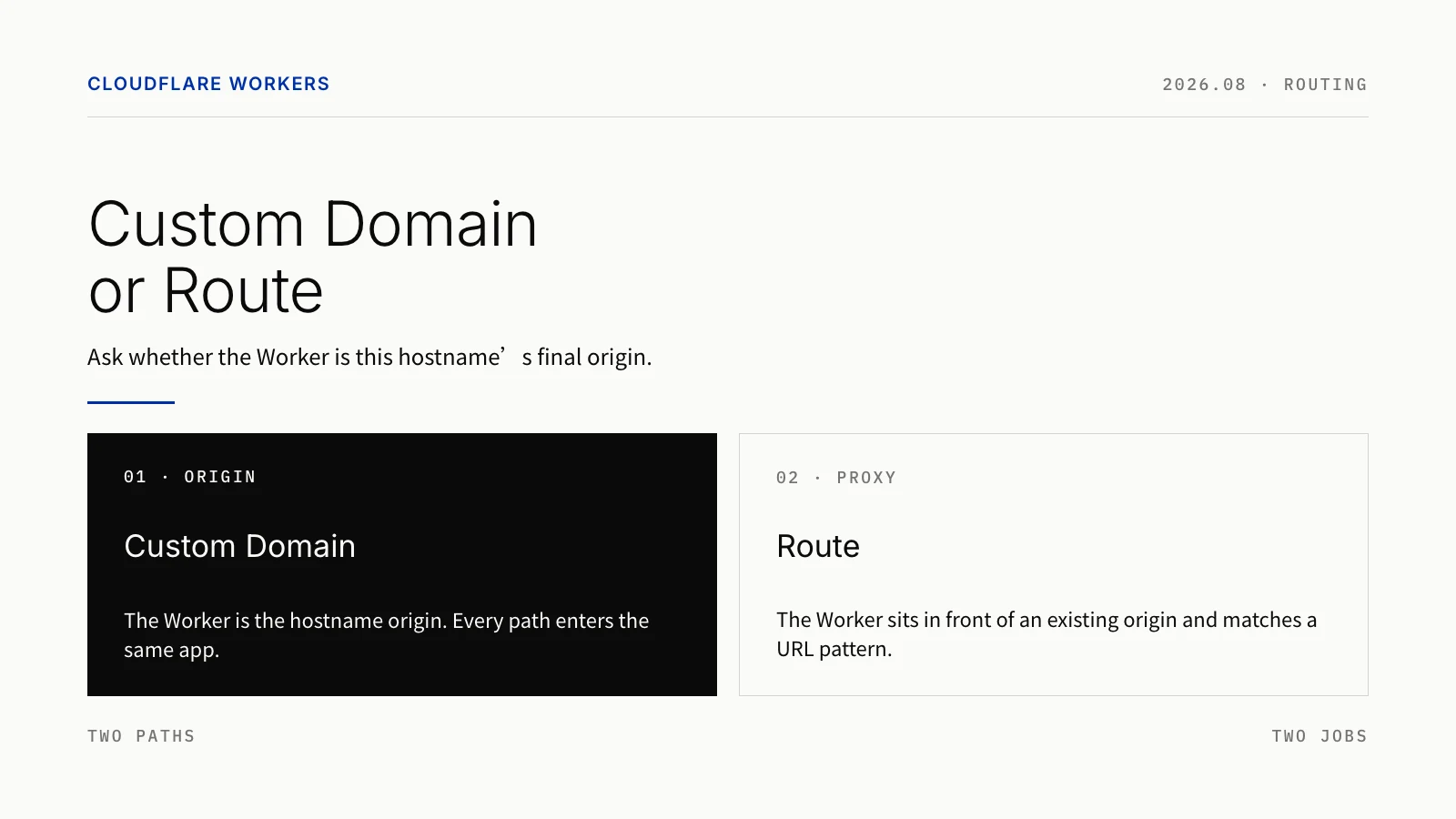
The Cloudflare Workers dashboard places Add Custom Domain and Add Route in the same spot, so they look like two ways to bind a hostname to a Worker. After you deploy, it becomes clear that they define two different request paths.
A Custom Domain hands an entire hostname’s origin to the Worker. A Route lets the Worker match a URL pattern first, then decide whether to send the request on to an existing origin. Use a Custom Domain when api.example.com is the Worker app itself. Use a Route when the site or API already has an origin and you only want logic in front of /admin/* or /checkout/*. Cloudflare draws the same line: is the Worker the application origin?
Two paths, two jobs
After you attach a Custom Domain to api.example.com, Cloudflare creates the DNS record for that hostname and issues the certificates it needs. /users, /login, and /v1/orders?status=open all reach the same Worker. Path and query string are not part of the Custom Domain binding. The Worker is the origin for that hostname. Whether it then talks to D1, R2, KV, or a third-party API is entirely up to your code.
A Route sits on a hostname that already exists. The request is matched against a URL pattern; if it hits, the Worker runs. If the code calls fetch(request), Cloudflare continues the request to the existing application origin using the zone’s DNS. That makes Routes a good fit for auth, rewrites, caching, rate limits, audit logs, gradual rollouts, and reverse proxies.

Figure 1: A Custom Domain makes the Worker the origin; a Route places the Worker in front of an existing origin.
| Topic | Custom Domain | Route |
|---|---|---|
| Problem it solves | Point a hostname’s origin at a Worker | Map a class of URLs to a Worker |
| Typical uses | New APIs, webhooks, BFFs, edge apps with no traditional server | Auth, cache, rewrites, traffic splitting, reverse proxy, and reusing an existing CNAME as an optimized ingress |
| What triggers it | Every path on an exact hostname | Scheme, host, and path can all be matched |
| DNS prerequisite | Cloudflare creates the DNS record | The hostname already needs a Cloudflare-proxied DNS record |
Usual meaning of fetch(request) | The Worker fetches the dependencies it needs | The request continues to the existing origin via zone DNS |
| Same-zone Worker access | Other Workers can fetch() it by hostname | It cannot be the target of a same-zone fetch() |
This is not a question of which feature has more options. The application boundary is different.
Strengths and limits
A Custom Domain is direct: the hostname is the Worker app’s public entry. Cloudflare manages the DNS record and certificates. When the Worker is the API or application backend, you do not need a placeholder server that exists only so traffic has somewhere to go. It can also be the HTTP fetch() target for other Workers in the same zone.
The constraints are equally clear. Binding is per exact hostname. You cannot take over a single path, and wildcard DNS is not supported. The apex and www have to be handled separately. A hostname that already has a CNAME cannot receive a Custom Domain directly. After you delete one, check for a leftover Advanced Certificate.
A Route is finer-grained. You can handle one path prefix, one subdomain, or one scheme. When several patterns match, the most specific one wins. That lets you leave the existing origin in place, put auth, cache, logging, or a canary on a slice of traffic, then widen the scope later.
The cost is more configuration and more ways to get it wrong. Routes depend on an existing proxied DNS record. Patterns have wildcard, case-sensitivity, and query-string edges. The code has to distinguish a direct response from fetch(request) to the origin. A Route Worker also cannot be the target of a same-zone HTTP fetch(); internal calls should use a Service Binding.
| Dimension | Custom Domain | Route |
|---|---|---|
| Application entry | The Worker becomes the hostname origin | A Worker can sit in front of the origin without replacing it |
| DNS and TLS | Records and certificates are created for you; migrate CNAME conflicts first | Reuses existing DNS and origin; the record must be proxied |
| Routing | Every path on that hostname enters the Worker; there is no path-level binding | Match by scheme, host, and path; not regex, and query strings cannot be matched |
| Composition | Same-zone Workers can call it by hostname; that also creates a public entry for internal services | Fits as a policy layer in front of a business Worker; cannot be a same-zone fetch() target |
| Change risk | Best for new services or a Worker-only origin; confirm any origin-fetch assumptions before migrating | Best for low-risk, path-by-path changes; the Worker must handle origin fetch and failure paths |
One question: is the Worker the final origin?
If api.example.com has no traditional server, and the Worker owns API routing, data access, and outbound calls, then it is the final origin for that hostname. A Custom Domain’s DNS, certificate, and traffic model match that fact.
If www.example.com is still served by Next.js, Nginx, Kubernetes, or a SaaS origin, and you only want /admin/* to check a token first, or /checkout/* to pass a risk check, you do not need to hand the whole hostname to a Worker. A Route can intercept that traffic, then either respond directly or fetch(request) back to the origin.
A Custom Domain decides who serves the hostname. A Route decides which requests a Worker sees first.
Scenario: use a Route with an optimized CNAME for better ingress
When a site already runs on Cloudflare Workers, visitors in some networks — mainland China is the common case — hit poorly routed default Anycast ingress and high latency. A frequent community workaround is not to replace the Worker, but to pick a better Cloudflare ingress IP, then bind the original hostname to the Worker.
The usual chain is: CNAME www.example.com to an optimized CNAME such as visa.cn, then add a Route on the Worker with the pattern www.example.com/*. When someone visits www.example.com, resolution first lands on the Cloudflare IP chosen by that optimized name. After the request reaches the edge, the Host is still www.example.com, the Route matches, and traffic is bound to the Worker. The Worker then fetch()es the real site — Pages, another origin, or an existing app.
This has to be a Route, not a Custom Domain. A Custom Domain lets Cloudflare create and take over the hostname’s DNS record, so you can no longer point www.example.com at visa.cn. You also cannot create a Custom Domain on a hostname that already has a CNAME. A Route leaves your chosen resolution in place and only hands matching requests to the Worker.
[[routes]]
pattern = "www.example.com/*"
zone_name = "example.com"
Optimized ingress chooses which Cloudflare IP the client enters through. It does not bypass Cloudflare. Watch where authoritative DNS lives: if Cloudflare is authoritative and the record is proxied (orange-clouded), clients receive Cloudflare’s own proxy IPs, and the CNAME target is not the address they connect to. That is why the optimized CNAME is usually placed on DNS you control for the final answer, while the example.com zone and www.example.com hostname remain recognized by Cloudflare so the Route and certificate still match on Host.
This is not an official Cloudflare product. Optimized endpoints change and have to be maintained. Requests that hit the Route still count against Workers usage.
In Wrangler both are called routes, but they mean different things
Both can be written in Wrangler’s routes config, which makes them look like the same kind of rule. The switch is custom_domain = true. With that flag, the config says “this Worker is the origin for the hostname,” not merely “match this URL pattern.”
# Custom Domain: the Worker is the origin for api.example.com
[[routes]]
pattern = "api.example.com"
custom_domain = true
# Route: intercept /api/ on an existing site
[[routes]]
pattern = "www.example.com/api/*"
zone_name = "example.com"The second block requires www.example.com to resolve, and that DNS record must be proxied by Cloudflare. The Worker can return a response itself, or fetch(request) to send the request back to the matching application origin.
Routes can select by path. Custom Domains cannot
A Custom Domain matches an exact hostname only. Binding api.example.com does not cover www.example.com, and wildcard DNS is not supported. Configure the apex and www separately, or use a Redirect Rule from one to the other.
Route rules are finer, but they are not regular expressions. The only operator is *. You can specify scheme, host, and path, and the most specific pattern wins when several match. Patterns cannot include query parameters, and they cannot place a wildcard in the middle of a path — example.com/*.jpg is invalid. The path component is case-sensitive.
Another easy trap is *example.com/*. It can match myexample.com, not only example.com and its subdomains. If you want the apex and subdomains, write example.com/* and *.example.com/* as two rules.
| Need | Better fit | Why |
|---|---|---|
Every path on api.example.com is a Worker API | Custom Domain | The Worker is the hostname-level origin. |
Only /admin/* should pass through an auth Worker | Route | You need path-level matching. |
Audit logs in front of existing www.example.com | Route | The Worker runs before the origin. |
CNAME www.example.com to an optimized name, then let a Worker handle the traffic | Route | Keep the existing CNAME and bind the Worker by hostname. |
Both the apex and www should respond | Two explicit configs, or a redirect | One Custom Domain does not cover another hostname. |
| Send different query strings to different Workers | Decide in Worker code, or use a binding | Route patterns cannot match query parameters. |
They can be combined: Route first, Custom Domain second
They are not mutually exclusive. Cloudflare can run a Route first on a hostname, then pass the request to a Custom Domain Worker.
For example, the Custom Domain for api.example.com points at a business Worker, while api.example.com/auth has a Route to a dedicated auth Worker. A request to /auth hits the auth Worker first for checks, logging, and rate limits. Failures return there. On success, fetch(request) continues into the Custom Domain Worker that owns the origin.
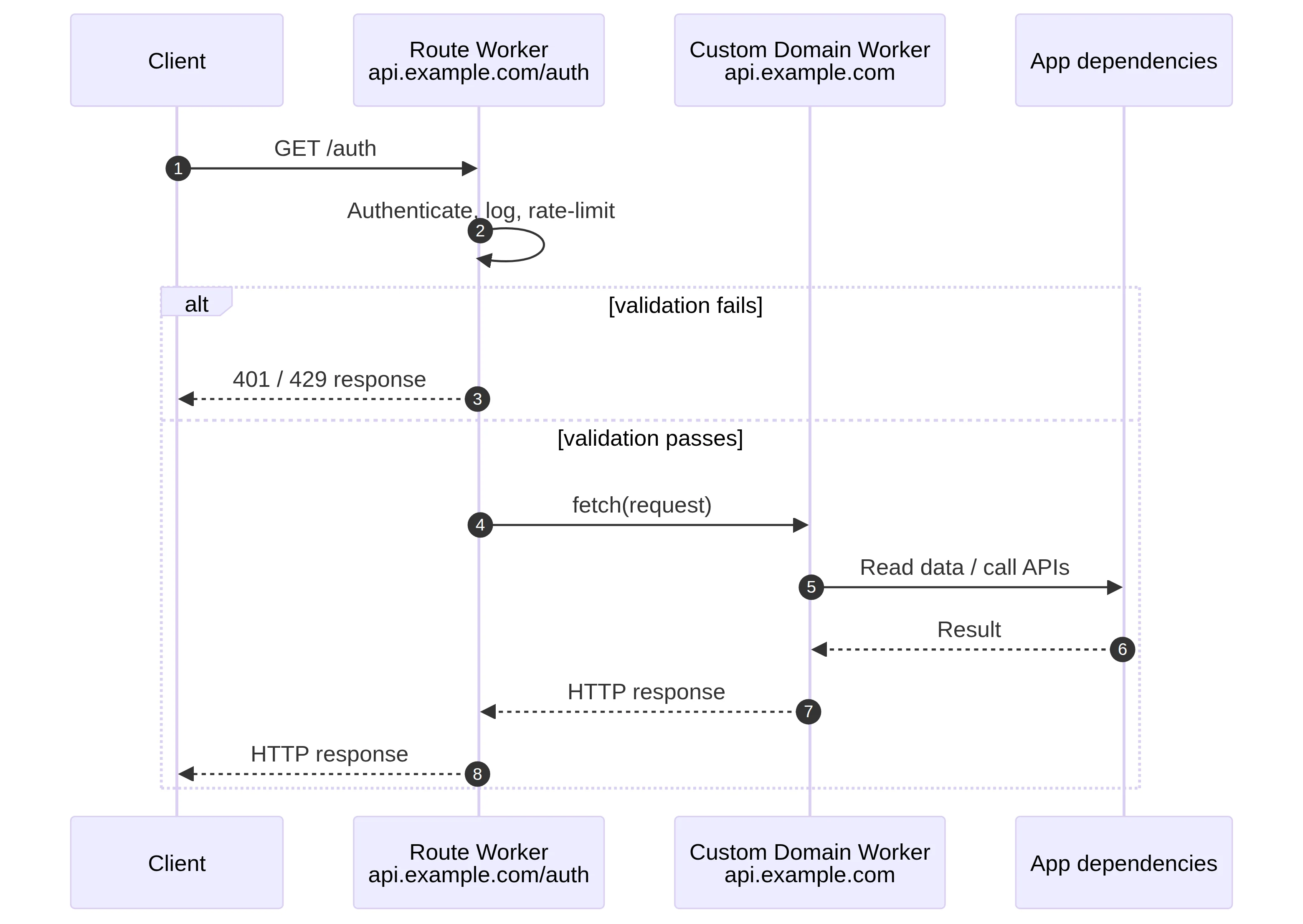
Figure 2: /auth enters the Route Worker first; failed requests return at the front layer, and successful ones reach the Custom Domain Worker through fetch(request).
That split keeps cross-cutting work — auth, audit, geo policy, request normalization — on the front Route, and the business API on the Custom Domain Worker. Keep the Route pattern specific, and be explicit about which branches stop and which call fetch(request). Otherwise it is hard to tell which layer produced a response.
Do Route hits count toward the daily request quota?
Yes. Cloudflare meters inbound requests to a Worker. There is no separate request allowance for Routes, Custom Domains, or workers.dev. An external request that matches a Route and actually runs the Worker is one inbound Workers request. Calling a Worker through a Custom Domain uses the same definition. A Route does not bypass the Workers request quota.
On the official docs checked for this article, Workers Free includes 100,000 requests per account per day, resetting at 00:00 UTC. Crossing the limit returns Error 1027. For Routes, the account can choose what happens at the cap: fail open bypasses the Worker and continues as if none were configured; fail closed returns the 1027 page.
fetch(request) to an origin is a different event. The client hitting the Route and running the front Worker is one inbound Workers request. The Worker’s fetch() to a traditional origin or external service is a subrequest. Cloudflare does not bill subrequests as extra Workers requests, but they appear in Subrequests metrics and consume the per-invocation subrequest quota. A normal “Route → fetch(request) → origin” path should not be read as two inbound Workers requests for one client request.
If the Route Worker then fetch(request)es a Custom Domain Worker on the same hostname, the downstream Worker does run. For that Worker-to-Worker chain, look at each Worker’s Metrics and the subrequest metrics. Do not size CPU, logs, or internal call load as if only one Worker were involved. For private internal services, a Service Binding is usually clearer than chaining through a public Custom Domain hostname.
| Scenario | Consumes one external inbound Workers request? | What else happens |
|---|---|---|
| Client hits a Route; the Worker returns a response | Yes | Worker CPU time and log usage |
Client hits a Route; the Worker fetch(request)es a traditional origin | Yes | One origin-facing subrequest, limited by the subrequest quota |
| Client hits a Custom Domain Worker | Yes | Worker CPU time and log usage |
| No Worker is attached or executed, or fail-open bypasses the Worker | No | Handled on the non-Worker path |
| Route Worker calls a Service Binding | The original client request still counts once | The internal call is limited by runtime resources and does not go through a public URL |
Paid Standard usage is monthly: 10 million Workers requests are included, then additional requests are billed. Free or paid, the rule is the same: a request counts when it reaches a Worker and the Worker runs.
Same-zone calls: reachable is not the same as public
Inside the same zone, a Worker can fetch("https://api.example.com") a Custom Domain Worker. Routes and workers.dev cannot be the target of a same-zone fetch().
Being reachable by hostname does not mean every internal service should be a public HTTP entry. Auth, billing, and rule-evaluation Workers are a better fit for a Service Binding: one Worker calls another without a public URL.
A simple split works well: Custom Domains for public HTTP; Routes for path-level front-door policy; Service Bindings for private Worker-to-Worker calls.
DNS and certificates: the usual surprises
A Custom Domain creates the DNS record and issues the certificates it needs, but it cannot be created on a hostname that already has a CNAME. Deleting the Custom Domain does not delete the associated Advanced Certificate. Clean that up under SSL/TLS certificate inventory.
A Route does not create hostname resolution. For it to work, the domain or subdomain already needs a DNS record, and that record must be proxied by Cloudflare. Adding a Route without a resolvable, proxied hostname will not send traffic to the Worker as you expect. If the goal is to CNAME www.example.com to an optimized ingress such as visa.cn, keep using a Route so that resolution stays in place. Do not switch that hostname to a Custom Domain.
| Common question | Custom Domain | Route |
|---|---|---|
| Do you prepare DNS first? | Usually no | Yes |
| Hostname already has a CNAME | Resolve the conflict first; you cannot create it directly | You can keep the existing DNS and origin |
| Cleanup after delete | Check for and remove a leftover Advanced Certificate | Delete the Route if needed; DNS and origin stay with the original config |
| Easy to miss | Apex and www are two hostnames | DNS must be proxied; the pattern is not regex |
When should a catch-all Route plus placeholder DNS become a Custom Domain?
Some Worker-only apps use an example.com/* Route plus a placeholder CNAME or AAAA, just so the hostname resolves. If the Worker is already the final application origin, consider moving to a Custom Domain. Cloudflare’s suggested order is: resolve conflicting CNAMEs, add the Custom Domain, then delete the old Route.
Look at fetch(request) in the code first. If that call means “send the request back to the old site unchanged,” switching to a Custom Domain rewrites the whole request path. Keep the Route, or split into a front Route plus a Custom Domain business Worker. A /* pattern is not the same thing as a Custom Domain.
Quick picks
| Your situation | Suggestion |
|---|---|
| New API, BFF, or webhook, and the Worker is the server | Use a Custom Domain |
| You have a traditional origin and only need edge logic on some URLs | Use a Route |
| You want to CNAME the hostname to an optimized ingress, then bind a Worker | Use a Route; do not let a Custom Domain take over DNS |
| You need path-level auth, rate limits, rewrites, or traffic splitting | Use a Route |
| You want a front-door policy layer and a business API on the same hostname | Combine Route + Custom Domain |
| You need private Worker-to-Worker calls | Use a Service Binding, not a public URL |
You do not need to rank the two features. Put the job in the right place: a Custom Domain decides how a Worker app is served as a hostname; a Route decides which URLs are intercepted before they reach an origin; a Service Binding handles internal calls that should not be public.
References
Mttao GitHub ↗
Exploring technology and life's wisdom