security · · 17 min read
Your Site Is Down Under a DDoS? Find Out Which Layer Broke First
Your CPU can sit idle while your bandwidth is full, and a handful of expensive requests can stall an app that looks fine. This guide walks through where DDoS attacks hit, how to tell them apart from traffic spikes and bad deploys, and which defenses cover which layer.
 Mttao @bearboy80 3,547 words 中文 →
When a site stops loading, someone in the team chat inevitably says, “We’re under a DDoS.” Sometimes that’s right. But the picture of thousands of people hammering refresh only explains one kind of attack. Some traffic chokes the link before a request ever reaches your server. Some attacks go after TCP connection state. And some send so few requests that you’d never notice them by volume, yet the app still can’t keep up with real users.
DDoS stands for distributed denial of service. Many sources send traffic at one target at the same time, and they exhaust its bandwidth, its connection state, or its ability to process requests. Legitimate users then can’t get through.
When an outage like this happens, the first question is which layer ran out of capacity. Everything else follows from that answer.
Low CPU doesn’t mean the site is fine
Loading a web page means a request passes through several stages. Here is a simplified version of that path.
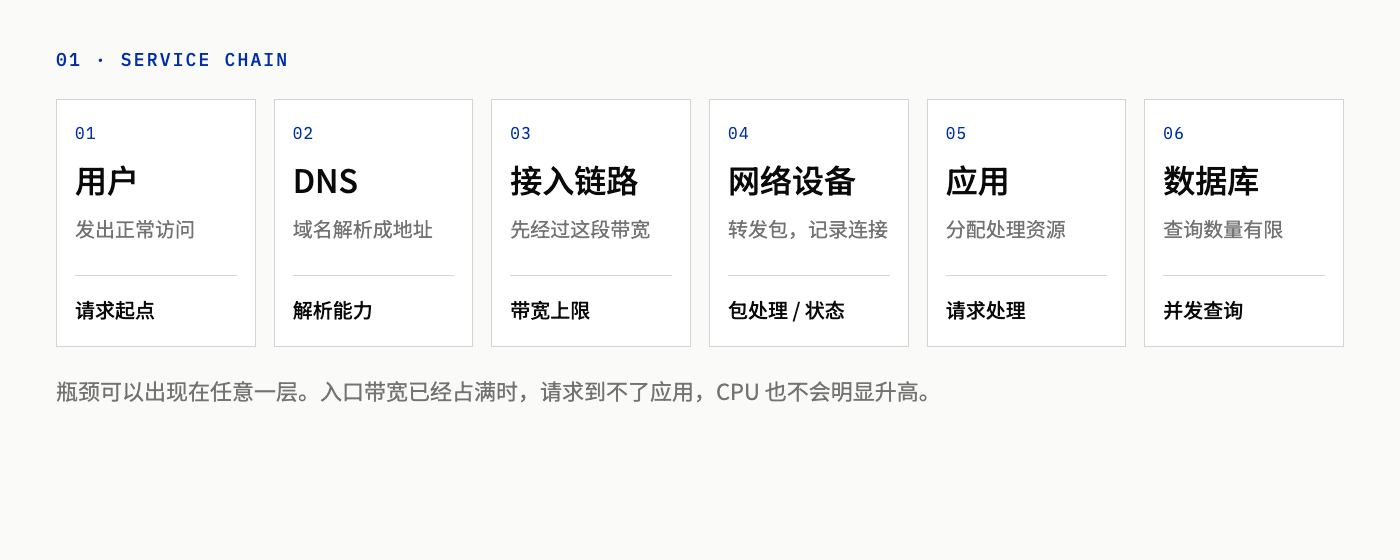
Figure 1: The bottleneck can sit in bandwidth, connection handling, or a backend query. CPU alone won’t tell you where it is.
The access link can only carry so much data per second. Routers and firewalls process packets one by one, and some also track every connection. The application allocates threads and memory for each request. The database can only run so many queries at once.
Whichever stage fills up first is the one users experience as “the site is down.” If the inbound link is saturated, requests never reach your machines, so CPU may stay low. The reverse can happen too: bandwidth looks fine and total request count is modest, but every request has to check permissions, hit the database, and render a page. The application stalls anyway.
DDoS attacks target availability. The attacker doesn’t need a login or database access. A site being unreachable doesn’t mean data was stolen. Whether there was an intrusion is a separate question, and you need evidence to answer it.
Where the traffic comes from
A DoS attack comes from a single source. A DDoS attack comes from many sources working together.
Those sources don’t have to share a network, and they usually aren’t the attacker’s own machines.
Botnets
The most common approach is a botnet. The attacker infects a fleet of internet-connected devices with malware, then remotely directs them to send requests. The devices might be personal computers, but routers and IP cameras are popular targets too.
The owners of those devices usually have no idea. The target sees requests arriving from many different IP addresses. Blocking them one by one rarely keeps pace with the attacker rotating addresses, and it can catch ordinary users who share an outbound IP with a compromised device.
A large number of sources doesn’t mean the traffic is evenly spread, either. How many sources there are, where they are, and what their requests look like all have to come from monitoring. The word “distributed” by itself tells you nothing.
Reflection and amplification
Another approach borrows public third-party services.
The attacker spoofs the source IP of each request so it appears to come from the victim. The third-party server then sends its replies to that address. That’s reflection. The replies land on the victim, and the sender never sees them.
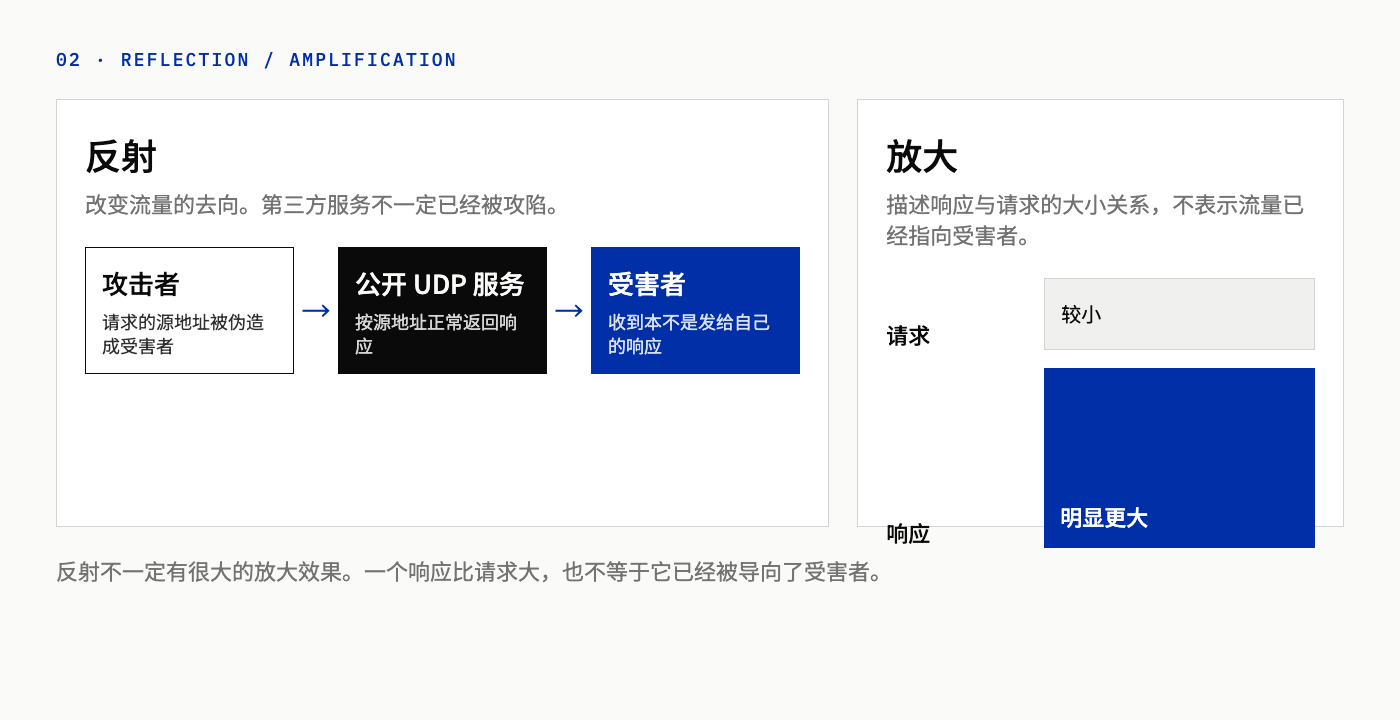
Figure 2: Reflection decides where the packets go. Amplification decides how much bigger the response is than the request. The third-party service involved isn’t necessarily compromised.
Amplification is about size. A small request that triggers a much larger response multiplies the original traffic. DNS, NTP, and Memcached have all been abused this way.
Reflection and amplification often show up together, but they’re different things. A reflected attack can have almost no amplification. A response being larger than its request doesn’t prove it was aimed at a victim.
The abused servers are usually public services that answer anyone who asks. UDP has no handshake that verifies the source address, so spoofing is relatively easy. That doesn’t make every open UDP port a usable reflector, though. Application-level validation and network-level filtering both make these attacks harder to pull off.
Three attack types and what each one exhausts
Volumetric, protocol, and application-layer attacks are a way to classify which bottleneck an attack targets. Real attacks often exhaust more than one resource, and attackers switch tactics mid-stream.
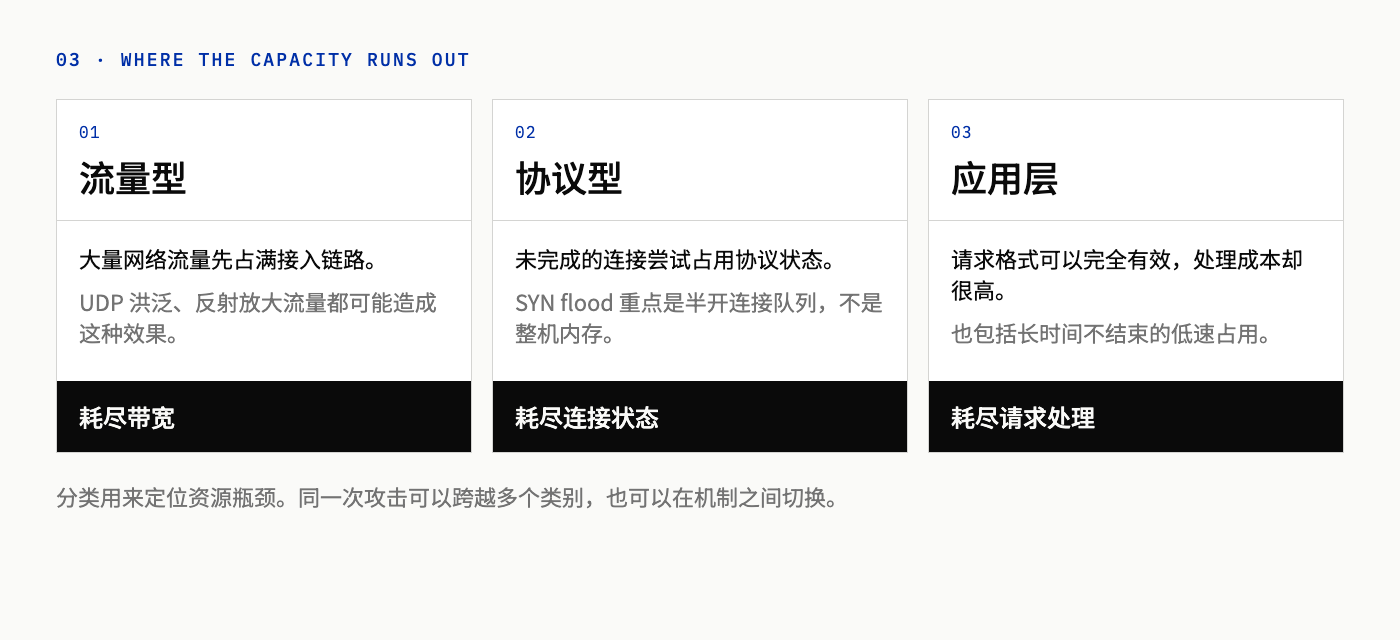
Figure 3: The examples are not exhaustive, and a single attack can span several categories.
Volumetric: the link fills up first
Volumetric attacks aim at bandwidth. They flood the path between the target and the internet until it’s saturated. UDP floods and reflection-amplification both do this.
Once traffic has entered the access link, the bandwidth is already spent, even if the server drops every packet right away. The server can recognize junk traffic, but users still can’t reach the site. Large floods generally have to be absorbed or filtered upstream, by the ISP or by a network with enough capacity to soak them up.
Protocol: half-open connections hold state
A TCP connection normally starts with a three-way handshake. Here is a simplified version of the exchange.
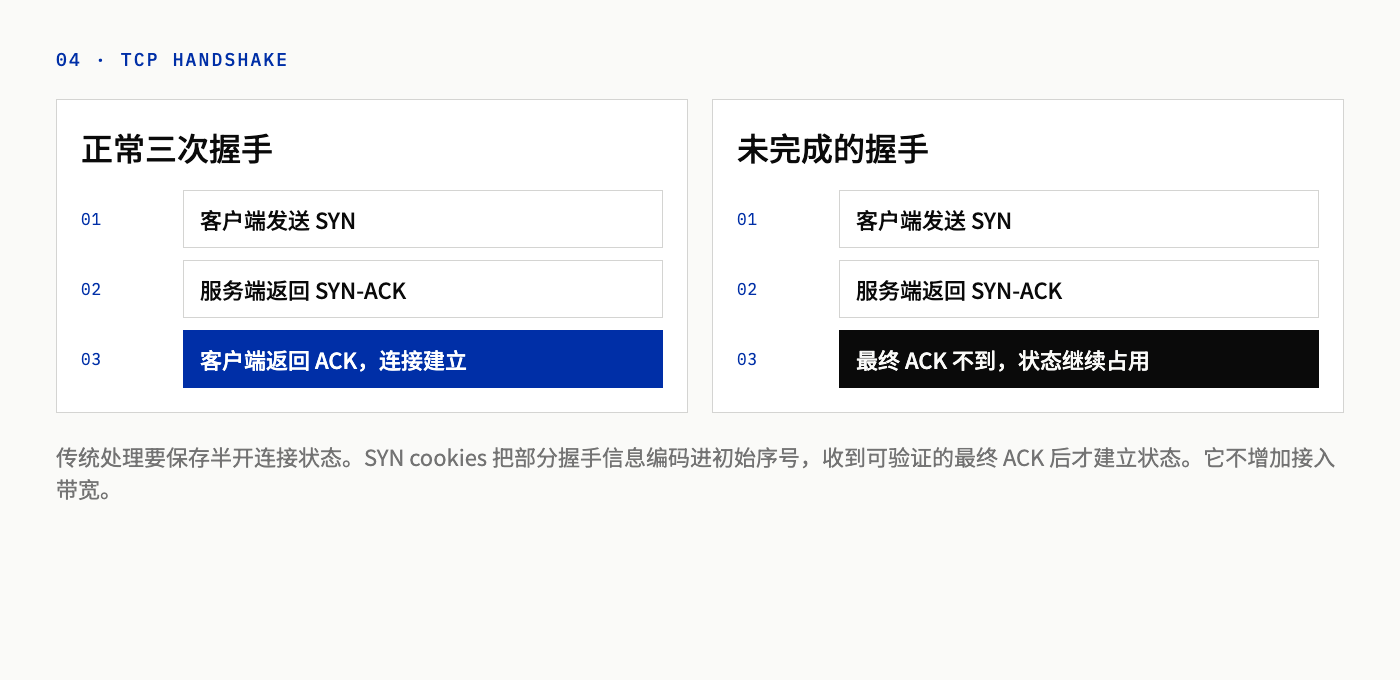
Figure 4: A normal connection completes SYN, SYN-ACK, and ACK. How many resources a half-open connection consumes depends on the implementation and its configuration.
After the server sends SYN-ACK, the connection sits in a half-open state until the client’s final ACK arrives. Traditional implementations keep state for these connections while they wait.
SYN floods exploit exactly this. The attacker sends a flood of SYNs that never complete the handshake. Those half-open entries fill the backlog queue for the listening port, and legitimate new connections can’t get in. You can watch for this by counting connections in the SYN_RECV state. RFC 4987 describes the problem as exhaustion of this half-open queue, not as a machine running out of memory.
How large the queue is and what happens when it fills varies by operating system and configuration. Not every TCP service falls over under this kind of pressure.
SYN cookies are one mitigation. The server encodes some handshake details into the initial sequence number of its SYN-ACK and skips storing full state for each half-open connection. It only allocates resources once a final ACK arrives that validates. This eases the pressure of holding state for unfinished handshakes. It doesn’t add bandwidth, and it doesn’t replace application-layer checks. Support for TCP options also differs across operating systems, so compatibility notes about older approaches in the RFCs shouldn’t be assumed to apply to every modern system.
Application layer: small requests, expensive work
HTTP floods target the application’s ability to process requests. The requests are well-formed. What’s wrong is their rate or distribution, and legitimate requests end up waiting in line. Two common tactics: repeatedly hitting expensive endpoints like search, login, or checkout; or appending random query parameters so requests bypass the CDN cache and every one of them lands on the origin.
A single HTTP request might be a few hundred bytes. To answer it, the server may need to verify credentials, query the database, and render a page or a JSON response.
A simplified calculation shows how big that gap can be. Suppose a system has 200 fixed concurrency slots, and each request occupies one slot for its full duration:
- At an average of 20 ms per request, the theoretical ceiling is about 10,000 requests per second (200 ÷ 0.02).
- At an average of 200 ms per request, the ceiling drops to 1,000 requests per second (200 ÷ 0.2).
These are proportional, back-of-the-envelope figures, not benchmarks of any real site. Async processing, shared CPU, database limits, and queueing all shift the actual numbers.
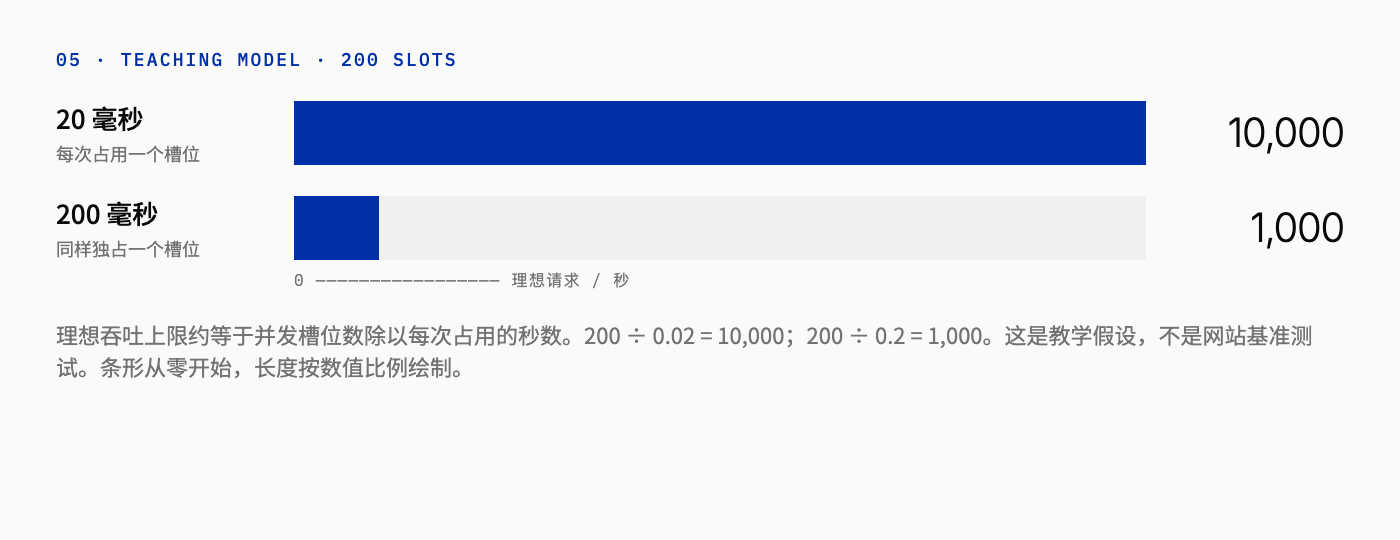
Figure 5: Both bars start from zero and are drawn to the 10,000 and 1,000 scale. The numbers come from the assumptions above, not from a benchmark.
The same request count can carry a tenfold difference in load. If you only watch total requests, you can miss the moment an expensive endpoint is already saturated.
Low and slow: slowness alone can take a service down
Application-layer attacks don’t always need a high request rate. Low-and-slow attacks keep connections or requests open for a long time, tying up limited resources. Slowloris is a classic example: it sends incomplete HTTP headers and trickles in a bit more data now and then, so the server keeps those connections open indefinitely.
On servers that dedicate a thread to each request, one hung request ties up one thread. Other concurrency models may be limited by connection count, buffers, or other per-request state, depending on the implementation.
So alerting only on sudden bandwidth spikes will miss this class of attack. Track how long connections stay open, how many are active, and whether timeouts are piling up.
Making sense of the numbers in a DDoS report
Bps, pps, RPS, and connection count each measure something different.
| Metric | What it measures | Where it shows strain first |
|---|---|---|
| bps | Bits transferred per second | Inbound bandwidth |
| pps | Packets processed per second | Per-packet work in network devices |
| RPS | HTTP requests per second | Request rate; says nothing about per-request cost or cache hits |
| Connections | Connections held open at once | Requests that never finish |
Volumetric attacks are usually judged by bps, because the link saturates first. When total bytes are similar, a flood of small packets can overwhelm devices by pps before bandwidth becomes the problem. RPS tells you how often HTTP requests arrive, but not how much work each one takes or how many were served from cache.
Two sites can have the same RPS, yet one serves requests in milliseconds while the other holds them open for seconds. Their load profiles are completely different. When you see a headline number, compare it with your own entry-point capacity, then check whether real users are experiencing latency, errors, or failed connections.
It’s slow. Don’t blame the attacker yet.
Flash sales and DDoS attacks both push a service to its limit. High CPU, slow responses, and request spikes are all symptoms, and none of them alone proves an attack. CISA recommends establishing a baseline of normal traffic first, then using network monitoring and logs to identify anomalies.
Find out which stage is failing
DNS resolution failing, a TCP connection that won’t open, and an application returning errors are three different problems. A homepage that loads while one API endpoint keeps timing out is also a different situation from a fully unreachable entry point.
If connections can’t even be established, checking application logs alone usually won’t reveal the cause. If only one class of dynamic requests is slow, look at the application and the backend services it depends on.
Compare against business patterns, not the quiet hours
Weekday and weekend traffic look different, and so do launch days and promotions. Comparing a sales peak with a quiet weeknight at 3 a.m. makes a legitimate surge look like an attack.
Signals worth looking at together: whether requests cluster on a handful of paths, whether client behavior repeats mechanically, and whether bandwidth, connection counts, and error rates rise at the same time. A single IP address or user-agent string rarely settles the question.
Many legitimate users share one public IP. A single address sending lots of requests might be an entire office building. Conversely, attack traffic spread across a large pool of addresses can look like normal browsing.
Application logs can’t see blocked traffic
Requests stopped at the edge never show up in application logs. Requests that are stuck behind a saturated link never reach the application at all. Application logs need to be read alongside edge protection data, network monitoring, and external uptime probes.
Successful logins and normal navigation paths help you understand what real users are doing. Before drawing conclusions, also rule out a bad recent deploy and a problem in the underlying infrastructure.
Two well-known incidents
Dyn, 2016
On October 21, 2016, DNS provider Dyn was hit by a large DDoS attack. The attackers used a botnet of IoT devices infected with the Mirai malware. Twitter, Netflix, Reddit, and GitHub were among the sites that were hard or impossible to reach for part of the day on the US East Coast.
Those sites’ own servers weren’t the targets. DNS translates domain names into IP addresses. When resolution failed, users couldn’t find the sites’ entry points, even though the servers themselves were still running. A site’s availability depends on its whole chain of dependencies, not only on whether its own application process is alive.
GitHub, 2018
In March 2018, GitHub was hit by a reflection-amplification attack that abused Memcached servers, with peak traffic around 1.35 Tbps. Attackers used Memcached instances exposed to the internet without access restrictions, turning small requests into large responses aimed at GitHub. No botnet was involved.
The source addresses the defenders saw belonged to public servers, not to the attacker’s devices. The two incidents exposed different weaknesses. Dyn showed how a shared dependency going down can take many sites with it. GitHub showed what a large reflected flood does to a service directly.
Scrubbing, CDN, and WAF each cover a different layer
Bottlenecks sit in different places, so defenses need to be layered too. Some vendors bundle several of these functions into one edge platform. The diagram separates them by responsibility; it doesn’t mean they must be deployed in that physical order.
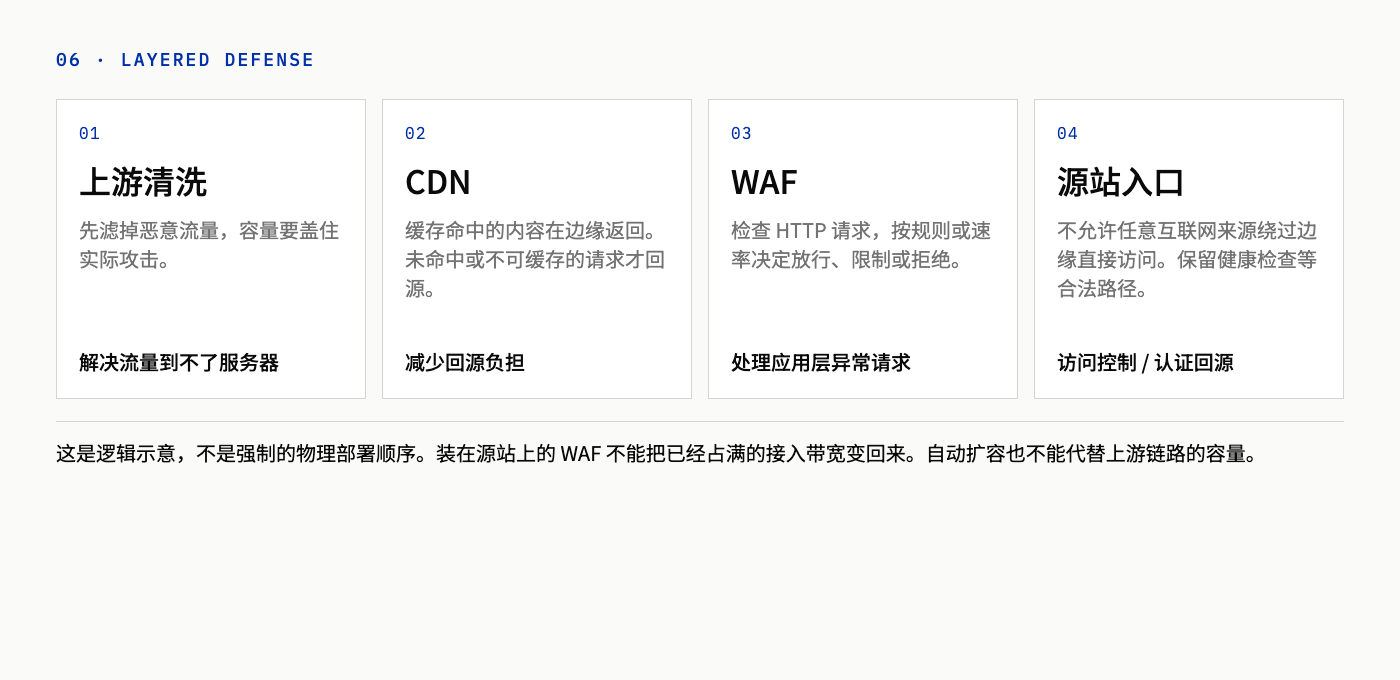
Figure 6: Cached content is served from the edge. Only requests that miss the cache, or that can’t be cached, reach the origin.
Upstream scrubbing
Scrubbing removes as much malicious traffic as possible and forwards the rest to the service. The scrubbing point has to sit upstream of the link that would otherwise be saturated, and its capacity has to absorb the attack.
Distributed edge networks can also spread the load across many locations. AWS’s DDoS resiliency guidance lists edge capacity and traffic engineering as mitigation strategies for large attacks.
Keep in mind that a provider’s advertised total network capacity doesn’t guarantee your site can withstand any given attack. How traffic reaches you, which resources the protection covers, and what kind of attack you’re facing all affect the outcome.
CDN: reducing origin load
A CDN caches content at edge nodes, so some requests never reach the origin. The origin is the server that runs your application and stores your content.
Images, scripts, and stylesheets are the easiest things to cache. Some dynamic pages can be split into shareable parts. Anything that can’t be cached still has to reach the backend.
AWS documents request collapsing: when multiple requests for the same uncached object arrive at the same time, an edge node can forward just one of them to the origin, provided the conditions are met. That depends on your cache configuration, so don’t assume every miss results in exactly one origin fetch.
To see how much the origin is protected, look at the cache hit ratio and the actual origin traffic. Be careful with personal pages such as account dashboards. Caching them to reduce load can leak one user’s data to another.
WAF: inspecting HTTP requests
A WAF (web application firewall) inspects HTTP requests and decides whether to allow, challenge, or block them based on rules or rate limits. It handles abnormal application-layer traffic.
A WAF running on the origin can’t free up bandwidth that’s already saturated. A WAF on an edge platform with network-level protection can work with upstream scrubbing and keep malicious requests from reaching the origin at all. Having a WAF doesn’t mean the network layer is covered.
Rate limiting: set it by cost
Rate limiting caps how many requests a client can make in a time window, which helps contain sustained floods. A single “N requests per IP per second” rule applied to every endpoint is usually a poor fit.
Distributed attacks can slip under per-IP thresholds. Meanwhile, legitimate users behind a shared NAT can get caught by the same limit. Static assets and expensive business endpoints shouldn’t share one limit. Challenges like CAPTCHAs don’t suit every endpoint either. Browser traffic and machine-to-machine API calls need separate handling.
When you evaluate a rule, check two numbers: how much attack traffic it removed, and how many legitimate users it failed. Throttling real users until they can’t use the site is an outage of its own.
Lock down the origin, and watch the cost of scaling
With a CDN in front, the origin still has to be locked down
If the origin accepts connections from any IP address, attack traffic can bypass the edge entirely. Hiding the origin’s IP isn’t enough on its own. You also need access controls, and where appropriate, authenticated origin pulls or a private connection.
An IP allowlist restricts who can connect. Authentication confirms that requests came through the expected path to the origin. Health checks and other legitimate traffic need a way through. The right choice depends on maintenance cost and your dependencies.
A misconfiguration can block legitimate origin pulls too, so test the full path before you go live. A DNS record showing the proxy as active doesn’t tell you the whole chain works.
Autoscaling adds application capacity, not bandwidth
More instances increase the application’s processing capacity. If the link is already saturated, extra servers won’t help. If a database or another shared dependency is the first to hit its limit, adding application instances may not raise throughput at all.
Malicious requests can also trigger autoscaling. The service might not go fully down, but the bill climbs. Protection policy, capacity limits, and cost alerts need to be planned together.
Some providers waive attack-related charges under certain conditions. That doesn’t cover every request, every resource, or all scaling costs. Being able to pay for more capacity doesn’t mean this layer has no limit.
What to do when an attack is underway
CISA’s incident response guidance includes confirming the attack, activating your response plan, contacting your network or hosting provider, and preserving evidence. The specific mitigations should follow what you observe, not a fixed playbook. These steps can run in parallel:
- Determine whether the entire site is unreachable or only one part is slow. Record the affected entry points and times, and assign an incident owner and a communication channel.
- Compare the traffic baseline against network metrics, edge alerts, and application logs. Check whether a deploy went out recently or whether the infrastructure itself has a fault.
- If the bottleneck is the access link, contact your cloud provider, host, or ISP right away. Changing application config at that point usually comes too late.
- Adjust existing scrubbing, access control, or rate-limit rules based on the evidence. Watch whether the attack subsides and whether legitimate users are being caught. Keep the key logs, rule change records, and an incident timeline.
- After recovery, check whether any dependency is still degraded. Then update monitoring and the runbook based on the bottleneck the incident actually exposed. Write down any entry point that wasn’t covered before.
Preserving evidence doesn’t mean logging every request forever. Logging systems have their own throughput, storage, and cost limits. Decide which fields to keep and for how long before an incident happens.
Preparation matters more than the response
Many teams look at traffic metrics for the first time when the attack is already underway, which is usually too late. Do these things ahead of time:
- Establish a traffic baseline that covers weekdays, weekends, deploys, and promotions.
- Know the capacity limit of each layer, including bandwidth, connection counts, origin concurrency, and the database connection pool.
- Identify expensive endpoints and give them their own rate-limit or caching strategy.
- Make sure the origin can’t be reached directly, and check the CDN-to-origin path regularly.
- Confirm your DDoS protection contacts, escalation process, and service coverage with your cloud or hosting provider.
- Write a runbook that says who makes decisions, how to switch over, and which changes can be rolled back.
Wrapping up
Measuring protection isn’t just about how many requests were blocked. The useful questions are whether real users can finish key tasks, whether error rates have dropped, whether latency has recovered, and whether the origin and its dependencies are back under a sustainable load.
If the attack traffic is huge but users are still getting through, the defenses are working. If the attack traffic has dropped but users are still failing, look at whether dependencies are recovering from overload, whether a rate-limit rule is blocking legitimate users, or whether something else has broken. The goal of DDoS response is to get the service back to normal.
Mttao GitHub ↗
Exploring technology and life's wisdom